MrMax
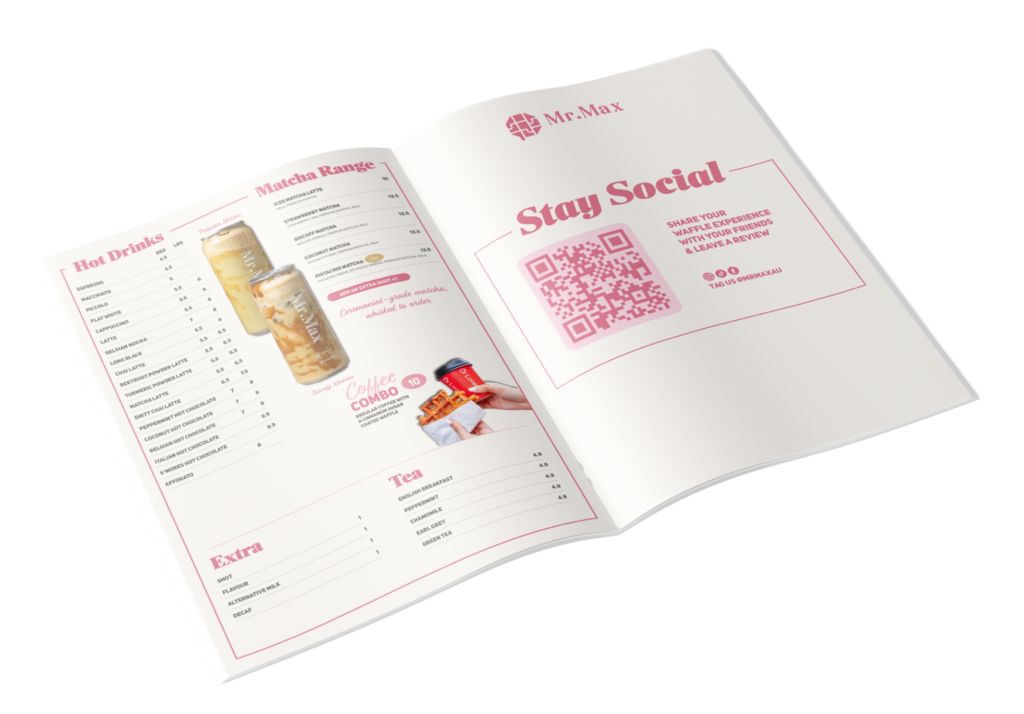
Menu design across three surfaces for a Riverwood dessert bar: printed, counter-top and an animated screen in store.

Menu design · Dessert bar
Home of the Waffle. A dessert bar in Riverwood that opens in the afternoon and trades until eleven, selling waffles, sundaes, shakes and cakes to people who came out specifically for dessert.
One menu, three surfaces: the printed menu, the counter-top card, and an animated version running on the screen in store. Each one is read in a different way, from a different distance, by someone at a different point in deciding. Each one had to be designed for that rather than exported from the last.
The problem with a dessert menu
A dessert menu is not a small restaurant menu. It is a different job.
Nobody arrives at a dessert bar hungry and undecided in the way they do at dinner. They have come out at nine at night, often in a group, often after eating somewhere else, and the decision gets made fast and out loud. The menu has about fifteen seconds before someone at the table says “I’ll just get what you’re getting.”
Three things follow from that, and they set every decision in this job.
Six categories is a lot to hold. Waffles, sundaes, shakes, sides, hot drinks, frappes. Without a hierarchy that says waffles first, a customer reads the whole board and orders the thing they already knew they wanted. The menu’s job is to make the hero obvious and let everything else be found rather than scanned.
The price spread does the hardest work. Thirteen dollars to thirty is a wide range for dessert. A thirty dollar waffle needs to read as an occasion, the thing you order for the table, the thing that gets photographed, rather than as a shock. Where a number sits, how it’s set, and what sits next to it decides whether that item sells or sits there making everything else look expensive.
The names are the brand. Simply the Best. Chocolate Lava. Doughnut Fries. That personality is already in the product, and a menu that sets them in something anonymous throws it away. The type had to let the names be the loudest thing on the page.
What I built
The printed menu, structured so waffles lead and the supporting categories sit where they’ll be found by someone who doesn’t want one.
A type hierarchy built for speed. Item name, then description, then price, in a rhythm that holds across every category so the eye learns it once and stops working.
Pricing set to be read, not scanned past. Prices carry weight in a dessert menu because the range is wide, so they were set to sit with their item rather than running down a column where a customer reads the numbers first and the food second.
The counter-top menu, which is a different problem to the one in your hands. It is read standing up, from above, at an angle, by someone already at the till with people behind them. It carries less, because the decision is nearly made by the time someone is standing there, and what it carries is the thing worth adding at the last second.


The animated screen menu, built for the display in store.
Built to the stock it would actually print on, and to how it would be read: in a warm, dim room, at night, by someone holding it at arm’s length.
The screen is not the menu with movement added
An animated menu is the piece most likely to be done badly, because motion is flattering and it hides a scheduling problem.
The trap is timing. A screen that cycles too quickly turns a customer into someone waiting for the waffles to come round again. That is fine in an empty shop and a genuine problem at nine on a Saturday with six people in the queue. The sequence has to be slow enough to read and short enough that nobody is stuck waiting for a category they’ve already seen. That is a design decision made with a stopwatch, not an easing curve.
Backlit is not printed. A screen throws light rather than reflecting it, so the contrast that reads as elegant on paper reads as washed out on a display, and the warm interior lighting the room is designed around is working against it. The screen version needed its own weights and its own colour handling. The same menu, not the same file.
The commercial argument for the screen is that prices move and printing doesn’t. A seasonal item, a price rise, a sold-out line: a screen absorbs all of it without a reprint. Built properly, it is the piece that keeps paying for itself.
Why it was worth doing properly
A menu is the cheapest thing on a rate card and one of the highest-leverage.
It is the only piece of design in a dessert bar that every single customer touches, reads and makes a decision from. A logo gets glanced at. A social post gets scrolled past. The menu gets studied, at the exact moment money is being decided, and every item that gets ordered because it was placed well is margin that arrives without any extra marketing spend.
Three surfaces multiply that. A customer meets this menu at the table, again at the counter, and again on the wall while they wait. If those three disagree, in hierarchy or in tone, the brand feels thinner every time. Getting them to agree is most of the work, and it is invisible when it’s done right.
That is the argument for treating a menu as a design problem rather than a typing job. Most don’t get it, which is why most dessert menus are a price list with a photograph on top.
Services
Menu design · Counter-top collateral · Animated screen menu · Typography and layout · Print-ready artwork